Alfred's ArchiVita
INTRODUCTION TO 3DS MAX & RHINOCEROS
Teahnology has offered human a golden opportunity to make a better world. At the same time, the design and working process in architecture evolute too. In this module, we have been introduced different software such as 3ds Max and Rhinoceros as an aid for us to present our ideology and works in a better and efficient way.
In the first project, we were asked to create a digital model with certain details of the building to show our capability of controlling and using computer softwares.
COMPUTER APPLICATION
PROJECT 1
MODELLING OF AN ARCHITECTURE DESIGN

Architecture Digital Visualization and Animation
 |
|---|
 |
 |
 |
 |
 |
 |
 |
EXTERIOR AND INTERIOR RENDERINGS
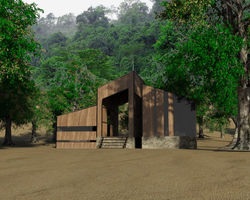
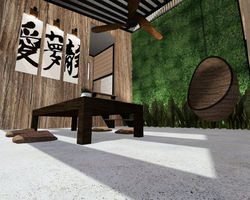
In project 2, generating exterior and interior renderings with materials certainty, lightings and camera views is the main challenge. With the aim of creating photo-relistic still renderings, we have been taught how to use lightings such as omni light, warm light or direct light in 3ds Max, as well as material insertions with bump effect and photography technique which influences camera placement in a space to create proportional picture.
PROJECT 2
STILL RENDERING WITH
MATERIALS, LIGHTS, CAMERA VIEW WITH SITE CONTEXT
 |
|---|
 |
 |
 |
MUSIC // CAMERA // ACTION
An interesting and exhilarating animation could be a better way for people to understand how does the building work. In this project, we are required to produce an animation at least 1 minute. This time, more lightings and details, which have to be careful adjusted was the hardest part. At the same time, time management was crutial as the rendering time was longer compare to another 2 project previously. However, it was an exciting project that you could see your efforts have given you satisfaction in the end of production.
PROJECT 3
90 SECONDS ANIMATION OF
THE COMPLETED 3D SCENE
WIP
WORK IN PROGRESS
A seriese of pictures which recoreded the working process of each project.
Please click the icon on the left to access WIP page. Thank you.


Alfred Lee Xue Chyi's Architecture Study e-Portfolio | Taylor's University

